Back
Adversary Intelligence
Table of Content
Gagan Aggarwal
No items found.

Executive Summary

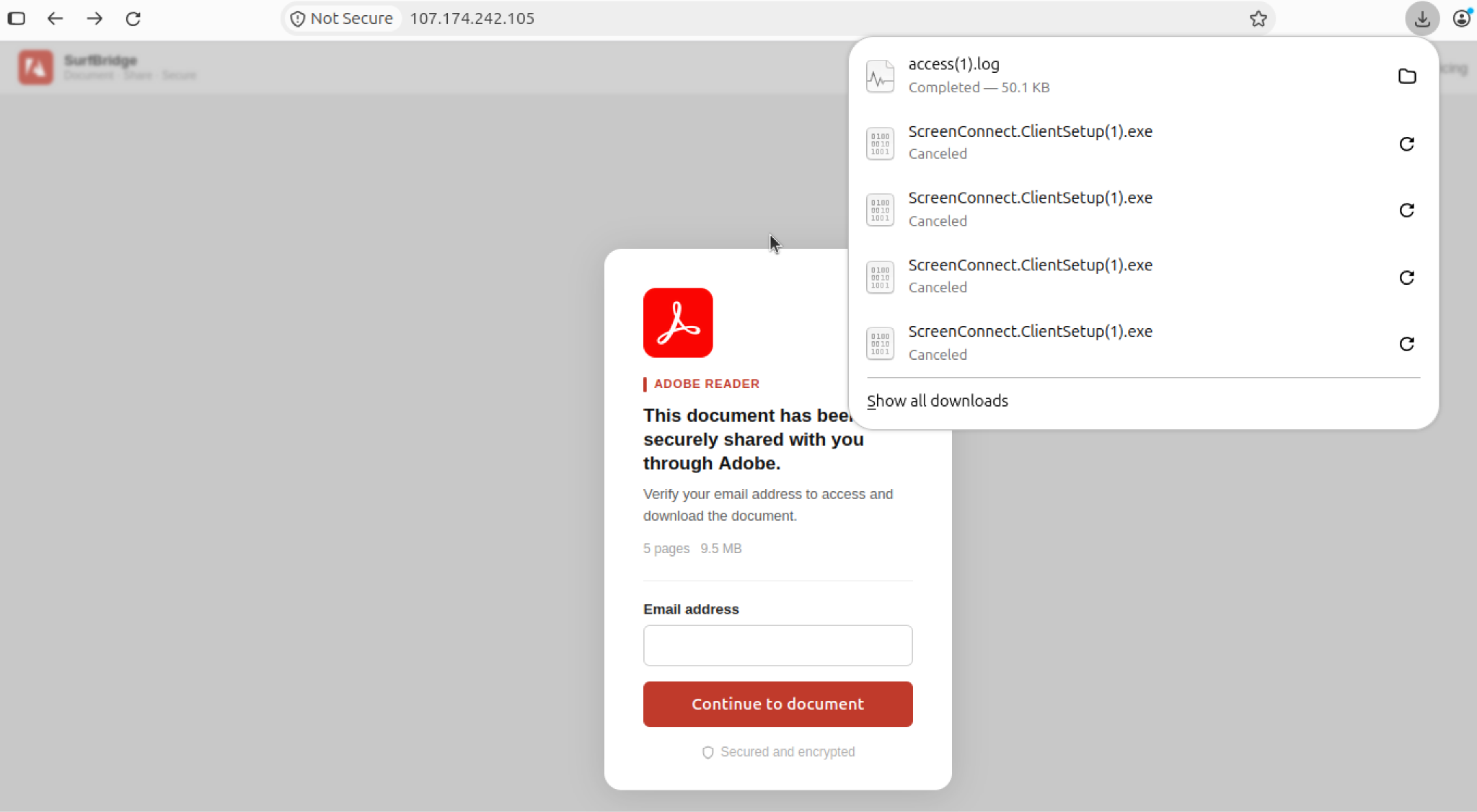
CloudSEK's Global Threat Intelligence platform, GTI, identified an Adobe Acrobat Reader-themed lure hosted at clickksy[.]icu was associated with downloads of two genuine, digitally signed ConnectWise ScreenConnect installers configured to connect to separate ScreenConnect Cloud tenants, omydze and vvvzou. The installers were not identified as trojanized; the risk stems from their preconfigured remote-access settings. If installed, they could establish persistent remote access for an external operator.

Analysis of 8 other URLs identified a related cluster of “View & Sign Form” pages. Five distinct page variants shared near-identical JavaScript and a common background image. The pages profiled visitors, sent visitor details to Telegram bots, applied operating-system and ISP-based checks, and automatically downloaded ScreenConnect clients configured for different tenants. One page redirected non-Windows visitors to the Adobe-themed URL, providing a link between the two delivery patterns.

The evidence supports a shared delivery technique, but it does not establish the identity or number of operators. Defenders should prioritize identifying unauthorized ScreenConnect tenant configurations and unexpected ScreenConnect services rather than relying on file hashes alone.
Threat Overview

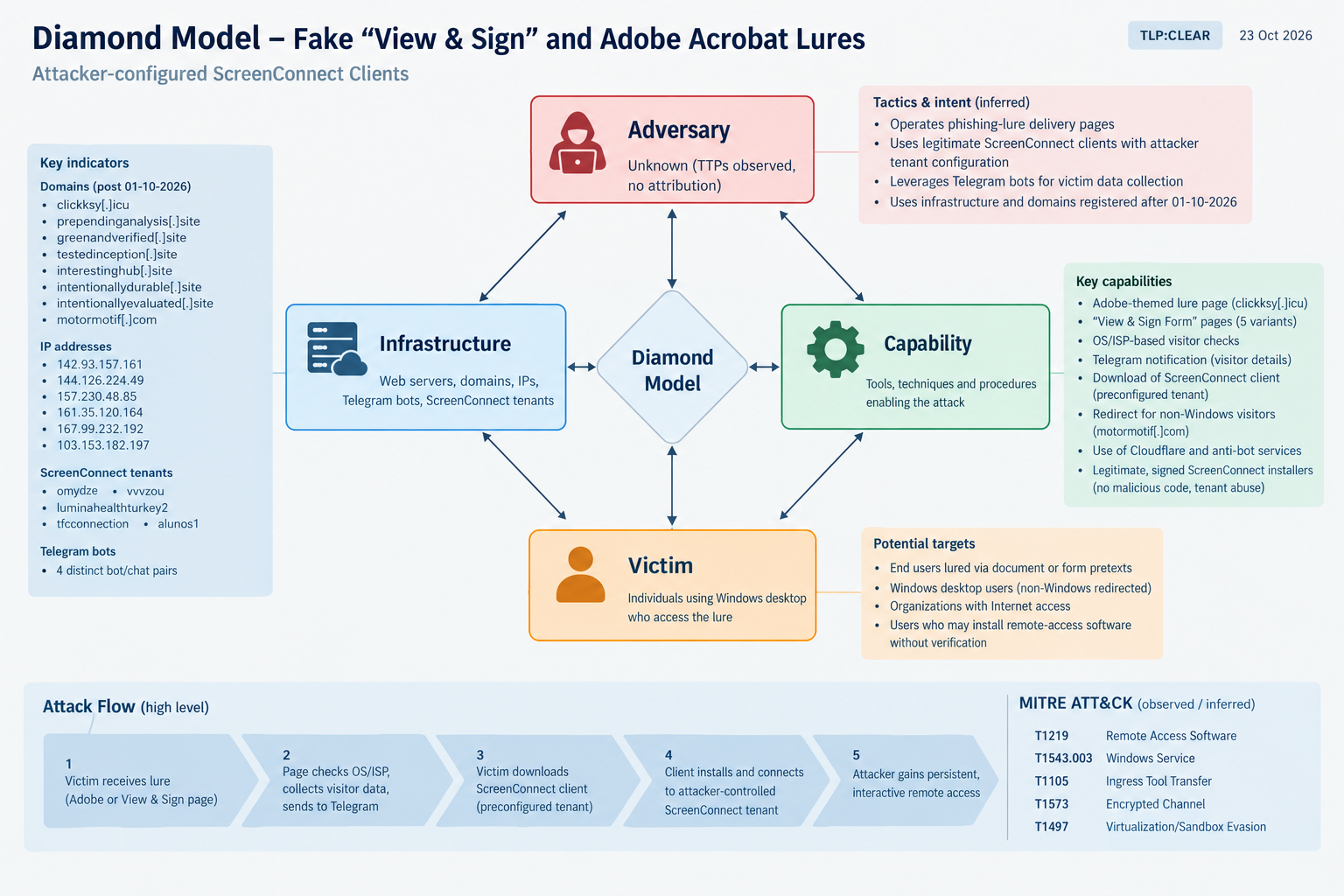
Figure 1: Diamond-model summary of the Adobe lures attack.

Key findings

  • Legitimate software, malicious configuration — High confidence. The two installers collected during the Adobe-lure investigation were digitally signed by ConnectWise, LLC. Their embedded configurations pointed to separate ScreenConnect tenants.
  • Potential persistent remote access — High confidence. The installers were configured for guest access and included relay details. Static MSI analysis showed an automatically starting service running as LocalSystem.
  • Connection between the lure and page cluster — Moderate confidence. A “View & Sign Form” page redirected non-Windows visitors to the Adobe-themed URL. The Adobe page itself could not be retrieved for independent inspection.
  • Shared page tooling — High confidence. Five page variants used near-identical code and the same background image. Four distinct Telegram bot/chat pairs were present in the page source.
  • Operator attribution remains unresolved. The shared kit could reflect one operator rotating infrastructure or multiple operators using copied or shared tooling.

Analysis

1. How the delivery pages operate


Figure. Evidence: Adobe lure used for screen connect download.

The “View & Sign Form” & “Sign in to view document” pages present a document-review or information-download pretext. Their observed behavior includes:

  1. Checking the visitor’s operating system and device type, redirecting visitors who are not using Windows desktop.
  2. Retrieving the visitor’s public IP address and geolocation information.
  3. Sending a Telegram notification containing visitor details, including IP address, ISP, device and browser information, time, and location data.
  4. Applying ISP-based restrictions that can suppress the download for selected network names.
  5. Automatically downloading a ScreenConnect client from a tenant-specific ScreenConnect address when the checks allow it.

The ISP-based restrictions are consistent with an attempt to reduce exposure to automated analysis environments, although their intent cannot be established conclusively from the page behavior alone. Telegram notification occurs before the ISP restriction, meaning the page can report visits even when it does not deliver the installer.

The pages use labels such as “Reference Information” and “Candidate Information downloaded successfully.” These labels are consistent with a document-review or recruitment-themed pretext, but the original messages or links used to direct victims to the pages were not identified.

2. Infrastructure and tenant relationships

Five origin IPs were associated with the observed page variants.

Origin IP Associated domain ScreenConnect tenant
142.93.157.161prependinganalysis[.]siteluminahealthturkey2
144.126.224.49greenandverified[.]sitetfcconnection
157.230.48.85testedinception[.]sitealunos1
161.35.120.164interestinghub[.]siteluminahealthturkey2
167.99.232.192intentionallydurable[.]siteluminahealthturkey2

Several additional .site domains returned page bodies identical to those on the origin servers, consistent with Cloudflare proxying. This relationship is inferred from matching page content and certificate information rather than direct access to proxy configuration.

The ScreenConnect tenants observed across the investigation were omydze, vvvzou, luminahealthturkey2, tfcconnection, and alunos1. Three clients downloaded during follow-up collection contained tenant-specific relay and fingerprint configurations. Their signatures were not independently verified during that follow-up, so those files should not be described as signature-validated.

3. Redirect and filtering behavior

Some pages redirected non-Windows visitors through motormotif[.]com/falscon. The page used a Google-like loading screen and an anti-bot challenge before forwarding to a fake identity-verification page.

The final destination returned HTTP 404 during collection, so its intended purpose could not be confirmed. This path may represent a separate phishing branch, but that assessment remains tentative.

The Adobe-themed domain clickksy[.]icu was registered on 2 October 2026 and had a wildcard Let’s Encrypt certificate issued on the same day. Requests during collection received a Cloudflare challenge, preventing direct retrieval of the page. Consequently, its full behavior and the precise relationship between the page and the two locally analyzed installers could not be independently confirmed from page content.

4. Technical behavior and MITRE ATT&CK mapping

The two locally analyzed Adobe-lure packages were configured to install a ScreenConnect Client (<fingerprint>) service that starts automatically and runs as LocalSystem. The packages also registered an sc-<fingerprint> URL protocol handler and included standard ScreenConnect Backstage components.

No credential capture was observed. The presence of vendor credential-provider components alone does not demonstrate credential theft.

Observed behavior and static configuration are consistent with the following MITRE ATT&CK techniques:

Technique Relevance
T1219 - Remote Access SoftwareUse of ScreenConnect for remote access
T1543.003 - Windows ServiceAutomatic service installation
T1105 - Ingress Tool TransferDelivery of the ScreenConnect client
T1573 - Encrypted ChannelEncrypted communications associated with remote access
T1497 - Virtualization/Sandbox EvasionAssessment based on visitor profiling and ISP-based gating

Note: No Windows execution or dynamic endpoint analysis was performed. These mappings should therefore be treated as assessments based on static configuration and observed web-page behavior.

5. Potential impact

No victim compromise was confirmed during this investigation. However, executing a client configured for an unauthorized tenant could provide an external operator with persistent, interactive access to a Windows system.

Depending on tenant permissions and subsequent operator activity, this access could support data theft, exposure of user sessions, lateral movement, or delivery of additional tools.

Valid vendor signatures do not make a remote-management client safe when it has been configured to connect to an unapproved tenant. Blocking only installer hashes is also unlikely to be sufficient because different tenants can generate different client builds.

Indicators of Compromise

The following indicators are included based on the investigation’s post-1 October 2026 observations and available registration, certificate, and modification-date evidence. These dates do not necessarily establish the exact first day each service was hosted.

Campaign domains
clickksy[.]icu
prependinganalysis[.]site
greenandverified[.]site
testedinception[.]site
interestinghub[.]site
intentionallydurable[.]site
intentionallyevaluated[.]site
motormotif[.]com
botsprotection[.]comObserved as an anti-bot dependency. Assess before blocking because its use does not establish that the service itself is malicious.
Origin IP addresses
142.93.157[.]161
144.126.224[.]49
157.230.48[.]85
161.35.120[.]164
167.99.232[.]192
103.153.182[.]197Associated with the motormotif[.]com redirect path.
107.172.140[.]34
172.245.145[.]8
107.172.249[.]7
107.174.242[.]105
192.3.109[.]170
192.255.139[.]9
ScreenConnect tenant identifiers
Tenant Fingerprint
omydze05bfeeab4e9fd390
vvvzoue0cd35c59df44587
luminahealthturkey2ec481756d6a5dea0
tfcconnection37786d5dac1c9480
alunos14468aa6e9842de2f

File hashes

Locally analyzed Adobe-lure packages

  • EXE SHA-256: e98a5f363645ab41597d73dc9df7859b154fb0a2a08e23623050c217e4f77d5d
  • MSI SHA-256: 1552fa772ad501e9b7024a0952bbc30637be23778896492e372a9aee463fa06a

Follow-up installers — configuration extracted; signatures not independently verified
  • luminahealthturkey2: dcd9db5cfaa4d1351d6d54e1be1ab87a21bcd9289e966e79d550ebffb2903660
  • tfcconnection: c7a4e83ae354d5c60acb878cc3a7c9fc06287e03a054fb7e8bc0b8fe6fa0a3f9
  • alunos1: 56a0c57d46e182827f1356e566337f9fd54404f9637c19369b188c39d3d127d3

Behavioral indicators

  • Page title: View & Sign Form
  • Telegram notification header: SecureDoc Downloaded
  • Download pattern: …screenconnect[.]com/Bin/ScreenConnect.ClientSetup.exe?e=Access&y=Guest&t=*
  • Service naming pattern: ScreenConnect Client (<fingerprint>)

Recommended defensive actions

Immediate actions

  1. Search proxy and DNS logs for the campaign domains listed above and downloads matching the ScreenConnect client URL pattern …screenconnect[.]com/Bin/ScreenConnect.ClientSetup.exe?e=Access&y=Guest.
  2. Identify ScreenConnect installations and tenant configurations that are not explicitly approved by the organization. Treat matching endpoints as requiring investigation.
  3. Submit the observed tenant identifiers and supporting evidence to ConnectWise for abuse review.
  4. Avoid broadly blocking shared ScreenConnect or Cloudflare infrastructure based solely on this activity. Prefer tenant-aware controls and validated indicators.

Threat hunting and remediation

  • Hunt for unapproved services named ScreenConnect Client (<16-hex-character fingerprint>) and associated sc-<fingerprint> URL protocol registrations.
  • Alert on connections to instance-*-relay[.]screenconnect[.]com when the tenant is not on the organization’s approved list.
  • Investigate browser-originated requests to Telegram’s sendMessage API when correlated with suspicious document-download pages. Validate detection logic against normal organizational activity before deploying it broadly.
  • If an unauthorized client is found, isolate the endpoint, preserve relevant evidence, remove the unauthorized installation, rotate credentials accessible from the host, and review remote sessions and file transfers during the exposure window.
  • Use application control or allowlisting to restrict remote-management software to approved tenants. Educate users that a document-viewing page should not require installing an unexpected remote-access tool.

References

Related Blogs